Resource usage
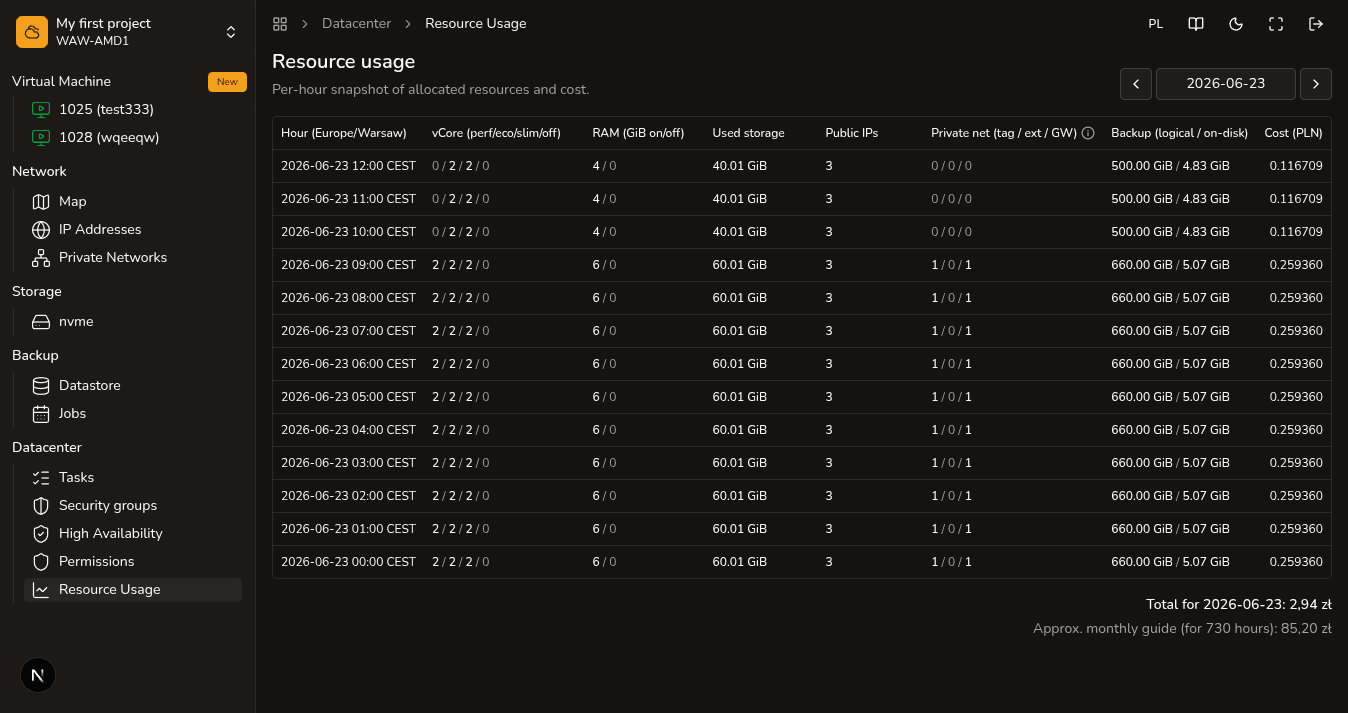
The Resource usage tab allows the project owner (Superadmin) to track hourly expenses in Polish Zlotys (PLN) for each type of active resource in detail.
Steps
- Open
Datacenter → Resource usage(only the project owner can access this section). - Review the hourly breakdown of costs across key categories: processors (compute), operational memory (RAM), disks (storage), public IPs, backups, and Cloud Gateway.
- Compare this data with active services in your project to understand the structure of your expenses.
- For payments and viewing accounting documents, navigate to the
Billingsection.
Watch out
The data on this page is intended for internal monitoring and budget planning. It is updated hourly but is not a financial or accounting document (official invoices are generated exclusively in the Billing section).
Next steps
- Billing — payment models and invoice management.
- Stopped VM costs — details about charges for stopped servers.